Home/Hardware Tinkering/ProjectMBP
ProjectMBP
Two old MacBook Pros turned into daily Linux machines, and everything I wrote to make that work: GPU hot-switching, a performance daemon with a neural network in it, a wall of hardware instruments and a native WhatsApp client.
- When
- 2026
- Built with
- C, C++, Python, Qt 6, GTK 3, Vulkan, OpenGL, Linux kernel
ProjectMBP started with a 13-inch MacBook Pro from 2011: a Sandy Bridge Core i5, Intel HD 3000 graphics, a spinning hard disk, and not much else. The idea was to make it a machine I'd actually want to use every day on Linux, and to write whatever was missing. It later grew to a 15-inch 2012 model with two GPUs, which is where the hardest part of the project came from.
Everything below was written for these two machines. They share one rule: the laptop is old, so nothing gets to waste its CPU, memory or battery.
flowchart TB
  A["MacBook Pro 13-inch, 2011<br>Core i5, HD 3000, hard disk"]
  B["MacBook Pro 15-inch, 2012<br>HD 4000 + GeForce GT 650M"]
  subgraph G["The GPU"]
    ZSS["ZrnSelectiveSuspend"]
    LR["ZrnLaunchRouter"]
    GP["GPU monitor"]
  end
  subgraph P["Speed and power"]
    PD["zrn_perfd"]
    BAT["Battery Manager"]
  end
  subgraph I["Instruments"]
    DISK["MechanicalDisk"]
    MEDIA["ZrnMediaHandler"]
    PROG["Progress Monitor"]
    WARN["Kernel warnings"]
  end
  subgraph D["The desktop"]
    WQ["WhatsQT"]
    AB["AutoBrightness and OpenTone"]
    WB["WindowBoot"]
    CH["Boot chime"]
  end
  A --> P
  B --> G
  B --> I
  A --> D
  B --> D
  LR --> ZSS
- ZrnSelectiveSuspend
- ZrnLaunchRouter
- The GPU monitor
- zrn_perfd, the performance manager
- The instrument panels
- WhatsQT
- AutoBrightness and OpenTone
- WindowBoot
- The boot chime
- SSHKeyboard
ZrnSelectiveSuspend
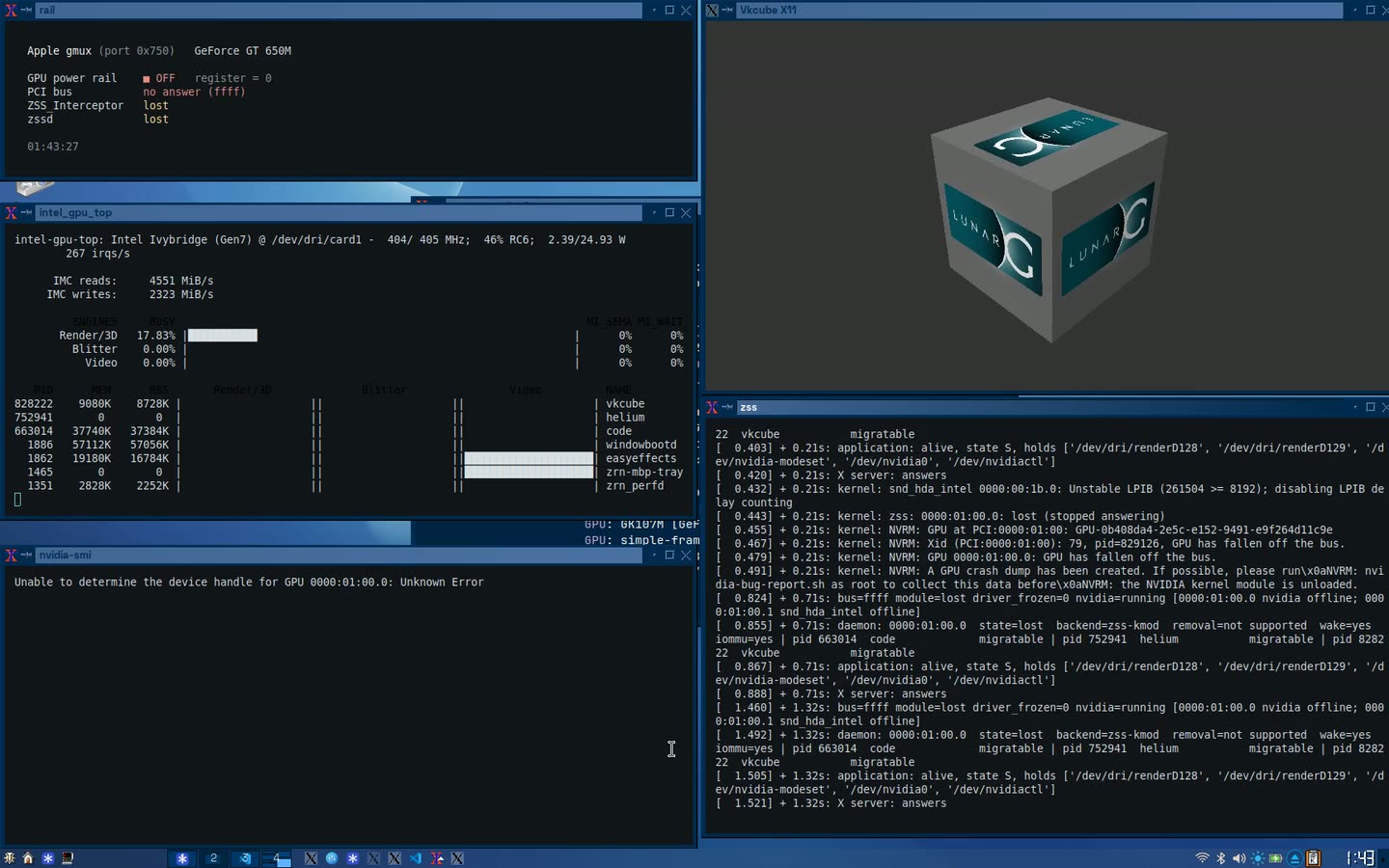
The 15-inch has two GPUs. ZSS takes the graphics card out of a running desktop and gives it back, with no reboot and no new session. Programs that were drawing on the card move to the other GPU while they draw, the card is powered off, and everything moves back when it returns. It can also lend the card to a virtual machine and take it back.
It has three parts: a Vulkan layer that sits between a program and its driver and can rebuild the program's GPU state on another card, a daemon that decides when to move things, and a kernel module that owns the card's power. On the MacBook the power switch is the Apple gmux chip.
It is an alpha. It is meant to work with any GPU and driver; today it is proven on two laptops.
ZrnLaunchRouter not published yet
ZSS can only move a program that was started under it. ZrnLaunchRouter makes that happen without anyone thinking about it: however a program is started (the menu, the dock, the file manager, a terminal, a script), it is started under ZSS if it should be.
Every way of starting a program ends in the same few C library calls. A small library, preloaded into the desktop session, wraps those calls and looks at each program as it is about to start. Browsers and Electron apps are recognised by the files that ship beside them, Vulkan programs by what they link to, and Unity games by their data folder. Each gets the right environment and flags. Anything else, and anything it is unsure about, starts exactly as asked. Steam, Wine and Proton are left alone.
The GPU monitor not published yet
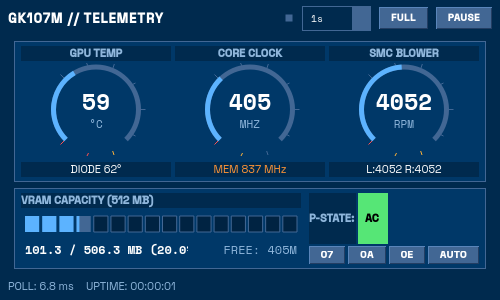
Telemetry and control for both GPUs under the open-source drivers. It reads the NVIDIA card's temperature, voltage and link, the Mac's two fans and its GPU temperature sensors from the SMC, the Intel GPU's clock, and which processes hold memory on which card. It can also switch the NVIDIA card between its clock states by hand.
zrn_perfd, the performance manager
This is the daemon that makes the 2011 machine feel fast. That laptop has two cores and four threads, and a browser alone can use them all. zrn_perfd's answer is that you can only look at one window at a time, so that window should get the whole machine and everything else should get almost none of it.
It is one C program with six jobs.
flowchart TB
  X["The window manager<br>which window has focus"] --> CORE
  subgraph CORE["zrn_perfd"]
    direction TB
    E["Exemption monitors<br>audio, GPU, switch pairs"]
    T["Tickle engine<br>pauses and resumes background programs"]
    L["Per-program CPU limits"]
    N["Next-window predictor<br>a neural network on the GPU"]
    H["Hardware power<br>charger, battery, disk spin-down"]
    B["Dynamic Boost and RapidBoost<br>CPU clock and backlights"]
    E --> T
    N -->|"wake the likely next window"| T
    H --> B
  end
  CORE --> CLI["Command line"]
  CORE --> TUI["Terminal dashboard"]
  CORE --> GUI["GTK window"]
The tickle engine
A program you aren't looking at is paused with a stop signal, then let run for a moment, then paused again, over and over. It stays alive and keeps its connections, but uses a small fraction of the CPU it would have. I call each short run a tickle.
stateDiagram-v2
  direction LR
  [*] --> Focused
  Focused --> Grace: loses focus
  Grace --> Focused: focused again
  Grace --> Paused: grace period over
  Paused --> Running: pause time over
  Running --> Paused: run time over
  Paused --> Focused: focused again
  Running --> Focused: focused again
  Grace --> Exempt: audio, GPU or on a list
  Exempt --> Focused: focused again
How hard it squeezes is a mode you choose:
| Mode | Left alone for | Then paused | Then runs | Share of the time it runs |
|---|---|---|---|---|
| Nominal | 30 s | 500 ms | 100 ms | about 17% |
| Moderate | 15 s | 1000 ms | 50 ms | about 5% |
| High | 5 s | 2000 ms | 20 ms | about 1% |
Pausing the wrong program would be worse than the problem, so some are never paused:
- Whatever is playing sound. The daemon listens to the audio server and knows which programs have a stream open, so music doesn't stutter when you switch away from it.
- Whatever is drawing on the GPU, such as a video being decoded.
- Pairs you flick between. If you keep switching between two windows, say an editor and a browser, it notices and keeps both awake.
- Anything on your own list.
Per-program CPU limits
The same pause-and-resume trick, used as a ceiling. You can say that a program may have 30% of the CPU and no more, and it is held to that without being killed. The limits are remembered across restarts.
Dynamic Boost and RapidBoost
The daemon also owns the CPU's clock. It keeps it low until the window you're using actually needs more.
stateDiagram-v2
  direction LR
  state "On the charger" as AC {
    Nominal: 2.3 GHz
    Turbo: 2.6 GHz turbo
    Nominal --> Turbo: focused window at 95% CPU
    Turbo --> Nominal: load drops
  }
  state "On battery" as BAT {
    Save: 900 MHz
    Rapid: RapidBoost, 1.15 GHz
    Save --> Rapid: focused window at 70% CPU
    Rapid --> Save: load drops
  }
  AC --> BAT: unplugged
  BAT --> AC: plugged in
RapidBoost on battery pays for itself. While the CPU runs faster, the keyboard backlight goes off and the screen dims to 25%, unless it was already dimmer than that. When the burst is over, the clock drops back and the screen returns to exactly the brightness you had set.
It reads the charger and the battery straight from the kernel, with no power-management package in between. On battery it also spins the hard disk down after 30 seconds without any reading or writing.
A neural network that guesses your next window
This is the experimental part, and my favourite. Pausing background programs has a cost: the moment you switch to one, it has to wake up. So zrn_perfd tries to know where you're going before you get there, and wakes that window early.
flowchart LR
  F["16 inputs<br>current program, time of day,<br>how fast you're switching,<br>your last 13 switches"]
  H1["32 neurons"]
  H2["16 neurons"]
  O["64 outputs<br>a probability for each window"]
  TOP["The most likely next window"]
  W["Woken early<br>with 100 ms of CPU"]
  F --> H1
  H1 --> H2
  H2 --> O
  O --> TOP
  TOP --> W
flowchart LR
  SW["You switch windows"]
  CMP["Compare the guess<br>with where you went"]
  LOSS["Measure the error"]
  SGD["Backpropagation,<br>one training step"]
  TEX["New weights sent<br>to the GPU"]
  NEXT["A better guess<br>next time"]
  SW --> CMP
  CMP --> LOSS
  LOSS --> SGD
  SGD --> TEX
  TEX --> NEXT
- It is a real network, written from scratch. Three layers and 2,160 weights. No machine-learning library is involved; the forward pass, the backpropagation and the training step are in the daemon's own C.
- It runs on the Intel HD 3000. That GPU is from 2011 and was never meant for this. The network's layers are written as fragment shaders, and its weights live in floating-point textures: each layer is a picture being drawn off screen. If the GPU can't do it, the daemon falls back to the CPU.
- It learns from you while you work. Every time you switch windows, it checks its last guess against where you actually went, measures how wrong it was, and takes one training step. The updated weights are uploaded back into the GPU's textures and saved to disk now and then. It also records every switch to a file, so the network can be trained on your own history before it starts.
- It costs nothing between switches. The network runs once when the focus changes, and not again until the next change.
The top candidate gets a 100 millisecond head start. If the guess was right, the window you land on is already awake.
Three ways to watch it
The daemon runs as a system service. To see what it's doing there is a command (zrn_perfd --predict prints the current guesses and how often they've been right), a terminal dashboard, and a GTK window with tabs for the processes, the predictor, the exemptions and the limits.
The instrument panels not published yet
I wanted the machine's hardware to be visible, the way it is on a workstation. So each piece of hardware has its own panel: a small Qt window whose centre is a live drawing of the thing it monitors. They take their colours from the desktop's theme, so they look like one set.
- Battery Manager. Power draw, charge rate, voltage, capacity, health and cycle count read from the battery's own controller, a usage history since the charger was unplugged, and a switch between performance and power saving.
- MechanicalDisk. For the spinning hard disk: a wireframe drawing of the drive whose platter and head move with the real reads and writes, with a spindle gauge and an I/O history.
- ZrnMediaHandler. Whatever is playing, from any media player, shown as a turning disc with a live spectrum and playback controls.
- Progress Monitor. Appears by itself the moment a file copy or a download starts, and shows where it is going from and to, and how fast.
- JamesDSP manager. Starts, watches and controls the audio processing engine, and switches its presets.
- Kernel warnings. A watcher reads the kernel's log for real errors (the graphics driver, storage, memory, Bluetooth, the network adapter) and shows a hardware warning dialog that says what failed in plain words.
WhatsQT
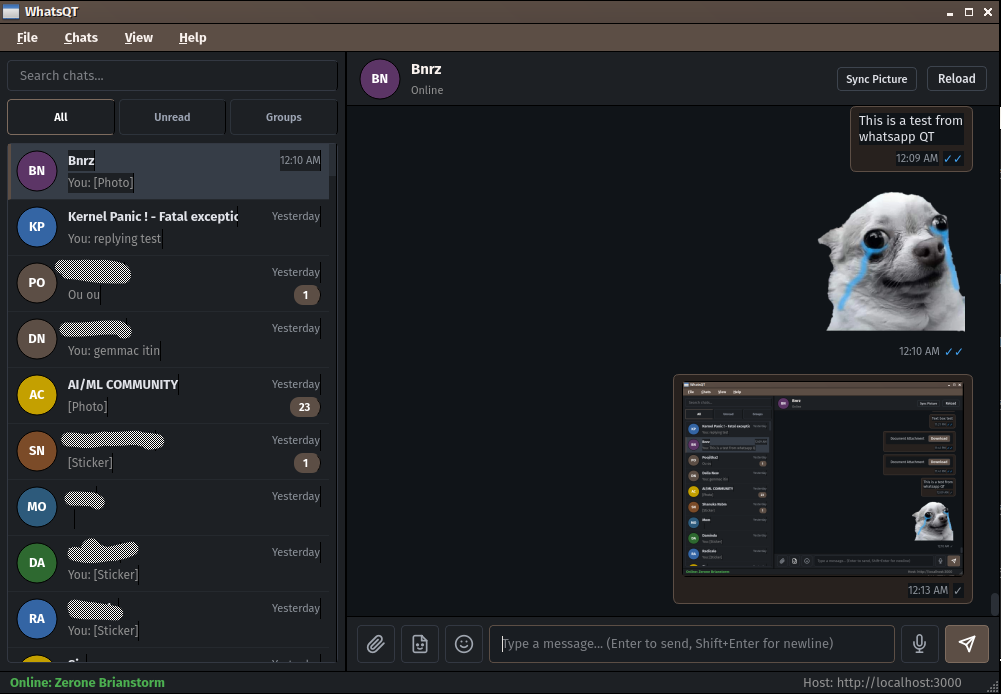
WhatsApp Web is heavy on a machine like this, so I wrote a client in native Qt 6 widgets, with no Electron and no web engine. It does voice notes, stickers, image paste from the clipboard, replies and forwarding, and links by QR code or phone number. It has 37 themes, including a few that reshape the widgets themselves. The backend runs locally in Docker or on a server.
AutoBrightness and OpenTone
Automatic screen brightness for Linux, from the laptop's own ambient light sensor, the webcam, or a phone's light sensor over the network. OpenTone is the other half: it measures the colour temperature of the room through the webcam and shifts the display's white point to match, the way True Tone does on a newer Mac.
WindowBoot
Window animations for Openbox with no compositor. A new window arrives as a title bar, blinks, then extends to its full height; closing runs it backwards. It is pure geometry, driven by resize requests, so it costs almost nothing and the window ends up exactly where Openbox would have put it.
The boot chime
A Mac should chime when it starts. This plays a startup sound from the initramfs, before the root filesystem is mounted, with a settings page to pick the sound and volume.
SSHKeyboard not published yet
Shares this laptop's keyboard and trackpad with another Linux machine over SSH. Nothing needs installing on the other machine: the small program that replays the input there is sent down the SSH connection each time. The window shows the link as an instrument, with the event rate and the round-trip delay.